
Follow us on Twitter


 General Ordering Information |
|
We encourage you to support your local shop. If you are not fortunate enough to have one or prefer to shop by mail, we're happy to help you find the supplies you need. We accept online, phone, snail mail or e-mail orders, whether you live close by or far away. International orders are accepted as well. At the time you place your order, please let us know of any deadlines you have. We do our best to ship in a timely fashion but it's critical for us to know of your specific deadlines when you place your order. We normally do not charge for orders until we ship them. If you are requesting an item we don't normally carry we will let you know if there is a deposit required. If you order online the system will capture your payment information but we don't use it until we ship the order. We will request that information if you order over the phone and again, we don't use it until we ship the order. You can also tell us whether to hold the order until is complete or do a partial shipment. And you can change that at any time by letting us know.
Payment methods accepted are cash, check, American
Express, Discover, Mastercard and VISA and PayPal. For mail
order requests if you are paying by credit card we
also need CCV code printed on your card. This is
the 3 digit number printed in the signature area
after the last four digits of your card number, or
if you have an AmEx card, the 4 digits printed on
the front above the last 4 digits. If you request PayPal we will send you an e-mail with your total when your order is ready to ship, so you can pay it that time. Your PayPal account will not be charged when you place the order.
|
| We do not accept orders from some
countries because of the problems with credit card
fraud from those countries or due to regulations like GPSR for the EU & Northern Ireland. We reserve the right to
refuse any orders we believe might be fraudulent. |
|
We have shopping cart on our web
site which is available through our Online Catalog page.
You can check out using a credit card or even just
tell us to use information you have already
provided us. While our entire inventory isn't
likely to show up in the on-line catalog it will
make the most common things available this way. It
is not a real-time inventory system so if you need
to know if we have an item in stock, please call
or e-mail us. Prices in the online catalog are subject to change and we reserve the right to charge the new price so your order total may be different from the online receipt. We try to keep the site as up-to-date as we can but that's not always possible. Often when we re-order items prices have gone up and we don't know that in advance. If that is not acceptable to you, please note that in the Special Instructions or give us a call to confirm a specific price. To use the shopping cart you'll
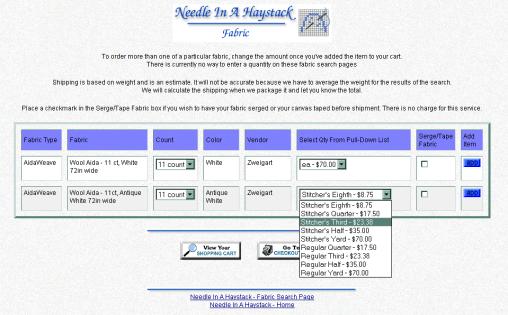
usually find either an Fabric pages have selections available for the cut size.
For lists with just a Quantity
pull-down list (see the above screen shot) you
must select a size BEFORE you click on the Add
button. If you click Add without selecting a
size/quantity you'll get an error message telling
you to select a quantity. For fabrics you can tell
us if you want your fabric serged (clean finished)
or your canvas taped by placing a check mark in
that box. Many of the lists (mostly threads)
have items in a list with one or more columns and
an area to enter the quantity for a given size.
You can enter a quantity in any of the columns so
that if you want the same item in more than one
size you can do so by entering a quantity in both
columns (see the first item in the example below).
Most threads also have a check box you can check
if you want your thread in a single dyelot. Since
dyelots do vary we recommend you check this box if
you need a consistent color. When you're ready to put this in
your cart, press the The shopping cart is set up so that
you don't see the items in the cart every time you
add something. I personally find this really
annoying if I'm adding a number of items such as
threads. You can view your cart at any time by
selecting the Nothing is charged until your order is ready to be shipped so the actual shipping cost will be added at that time - the cart will give you an estimate based on your shipping address and the method you chose. We currently have to estimate the weight of individual items for the shopping cart so it's not 100% accurate. Again, your card won't be charged until the order is ready and all of that is done by us at the shop vs. on-line. So if you want to add to an order you've placed and it's not gone out yet, you can make a note of that in the Comments field on the checkout form. If you have any questions, concerns
or comments with our online ordering please
contact us. If you run into problems you're more
than welcome to call us to place your order. |
|
We give no cash refunds,
only store credit. There are no returns or
exchanges on printed material, copyrighted items,
canvases, fabric, opened/used items, special
orders, lamps, stands and sale items. Most other
items may be exchanged or returned for store
credit within 14 days (3 months for currently
inventoried thread as a rule). Some items may be
subject to a 15% restocking fee. Please check with
us before placing an order to confirm how the
policy relates to your specific request. All items must be in sale-able
condition and things we current sell (so if you
stocked up on a thread we discontinued carrying
you will not be able to exchange it later). We
will not exchange thread that was not purchased
from us (yes, sometimes people do ask us to do
this). We are unable to accept returns on lamps
and stands unless there is a manufacturing defect,
so choose wisely. We may require a deposit for special order items, custom items or large quantities of a single item. We will inform you if a deposit is required before we order it. If you cancel an order for special order items or large quantities of thread or fabric after we have received the items to ship, those items are subject to a 15% cancellation fee. If you find that you have over ordered, or need to change an order, you need to inform us right away. We're always happy to answers
questions on any items before you make a purchase
to ensure you order the correct item and quantity. |
|
The shopping cart will give you a
rough estimate on the shipping - however, the
actual cost will be calculated by us at the shop
when the order is ready to go out as it is based on weight and method of shipment. If not
otherwise specific, we ship items via the U.S.
Postal Service, either as First Class Mail® or
Priority Mail®. You may select other
shipping methods - which can be changed before
final checkout. We do recommend UPS for large packages
and those that require closer tracking. All shipping methods include
insurance.
Please note that all US Postal Service
International packages must carry a customs form
regardless of weight or value and the insured
value is listed on the customs form. None of the companies will cover packages that are marked as Delivered but you cannot find. If you are concerned about package loss or theft in your area, please request that we have the package sent with Signature Confirmation so someone has to sign for it. It is available for USPS Priority Mail, UPS and FedEx at an additional charge. When we ship the order you will
receive an e-mail notification if you have given
us a valid e-mail address.
US Postal Service Tracking & Time Estimates Typical delivery times for USPS is 2-4 days for Priority Mail, 3-7 days for
First Class and 5-8 days for Ground Advantage. International orders can take anywhere from 7-30- days depending on country since it all depends on your country's postal service as well as ours. Please note that for international packages, only Priority Mail International (including Express) is trackable once it leaves the US. First Class Package International is only trackable within the US. You can receive text or e-mail status updates on your package once you have tracked it through the USPS website. If you are a residential US customer, you can also sign up for their Informed Delivery service. If for some reason your US bound package is delayed (e.g. you have
tracked it and it appears to be stuck somewhere), call the USPS directly
(1-800-275-8777), contact your local Post Office or use their online tools for Missing Packages and ask them to put a Tracer on it.That usually shakes it loose within a couple of days. If you feel you need to file an insurance claim, please contact us. We use a 3rd party insurance company for most postal insurance, not the post office. If
your package tracking shows "Your shipment was received" it means they
picked it up from us (they are supposed to scan them when they pick up,
but even that's not always happening). "Acceptance" happens when
it's scanned at the distribution center, but we are finding that a percentage of our packages are not getting scanned along the route. So
putting a Tracer on it after 4-5 days for Priority Mail and 7 days for
First Class is the best option. If the USPS says that "shipment received" but not having "acceptance" means we didn't give it to them, don't believe them. We use a master SCAN form for our shipments and when it is scanned by our postal carrier, it tags all of them as "shipment received". Since they don't always scan them after that, we have had the USPS claim it means we didn't give them the package. But it's them misunderstanding their own tools. Contact us to confirm when we handed it to the USPS if you need to. If your package shows as delivered but you cannot find it first check with neighbors in case they mis-delivered it to another address or with other members of our household. You would be surprised the number of times we get a report of package like this where a family member put it away and forgot to tell the recipient. If you still cannot find it contact either your postal carrier or your local post office to ask them what they did with it. Unfortunately insurance does not cover stolen packages. If you have concerns about that you can select to send the package Priority Mail and make a note to have us add Signature Confirmation, which is an additional charge, but means someone has to sign for it. |
|
|
You can specify on the check out form if you want to be added to our e-mail newsletter, which we send out regularly (and you can also find them online). We do not sell or give our customer list out to anyone. |
|
Deadlines If you need your order by a specific
date, please let us know that at the time you
place the order so that we can determine the best
shipping method and let you know if we can meet
the deadline. If your order is Urgent, please call us at the shop. |
|
Catalog Requests We do not produce a printed catalog and have no plans to do so. If you would like more specific information on a particular item or to see if we can obtain something, please contact us. |

 button next to the item
or if it's a long list
button next to the item
or if it's a long list  after the list (see the
screen shot below) so you can place items in your
cart. Most things they are displayed together and
you can either add them one at a time (each item
will have its own Add button) or it may allow you
to select several items and add them all at once
(there will be one Add button for an entire list).
after the list (see the
screen shot below) so you can place items in your
cart. Most things they are displayed together and
you can either add them one at a time (each item
will have its own Add button) or it may allow you
to select several items and add them all at once
(there will be one Add button for an entire list).
 button, usually at the
bottom of a page. After you've added an item
you'll see a brief message telling you the item
was added then you'll go back to the page you were
just on. If there isn't a Clear Form button at the
bottom of a list you'll have to REFRESH the page
in your browser to clear everything in that list.
button, usually at the
bottom of a page. After you've added an item
you'll see a brief message telling you the item
was added then you'll go back to the page you were
just on. If there isn't a Clear Form button at the
bottom of a list you'll have to REFRESH the page
in your browser to clear everything in that list.
haystack@needlestack.com
© 1998-2026 Needle In A Haystack - All rights reserved

Last updated September 2026
webmaster@needlestack.com